Schenectady Photographic Society

Menu

Photoshop

How to Use Layer Filtering to Organize Complex Projects in Photoshop

How to Use Layer Filtering to Organize Complex Projects in Photoshop

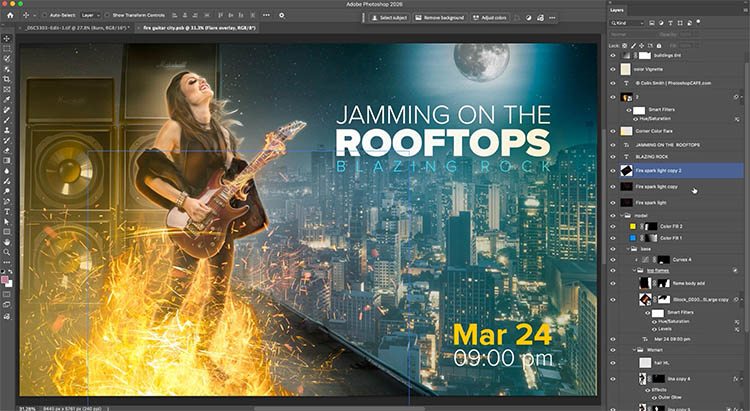
When working with dozens of layers in complex composites or designs, finding specific elements becomes a time-consuming challenge. The layer filtering system in the Layers panel offers powerful tools to instantly isolate different types of content, making organization and editing far more efficient. These filtering options help you quickly group Read the full article here: […]

Read more: How to Use Layer Filtering to Organize Complex Projects in Photoshop
5 Essential Photoshop Techniques for Digital Artists and Photographers

5 Essential Photoshop Techniques for Digital Artists and Photographers

Digital artists and photographers often find themselves repeating the same complex adjustments and effects across multiple projects. These five advanced techniques will help you work more efficiently while creating professional-quality results. From custom presets that save hours of color adjustments to hand-painted digital enhancements that set your work apart from Read the full article here: […]

Read more: 5 Essential Photoshop Techniques for Digital Artists and Photographers
Photoshop Layer Tools You Should Be Using (Hidden Features Guide) Layer Filters

Photoshop Layer Tools You Should Be Using (Hidden Features Guide) Layer Filters

When just naming your layers isn’t enough. When you are working with multiple layers, there are very helpful tools in Photoshop to help you organize and scan your layers panel. Especially if you have a composite or a design with a lot of layers. The problem is, most people aren’t aware of these tools, even […]

Read more: Photoshop Layer Tools You Should Be Using (Hidden Features Guide) Layer Filters
How to Create Realistic Lighting Effects and Dust Particles in Photoshop

How to Create Realistic Lighting Effects and Dust Particles in Photoshop

Creating convincing lighting effects requires more than just adding a bright spot to your image. The key to realism lies in ensuring your subject already has highlights that match the direction of your artificial light source, making the effect appear natural and believable. This technique combines a simple soft brush Read the full article here: […]

Read more: How to Create Realistic Lighting Effects and Dust Particles in Photoshop
How to Set Up Mouse Scroll Zoom in Photoshop for Faster Navigation

How to Set Up Mouse Scroll Zoom in Photoshop for Faster Navigation

Constantly reaching for the magnify tool or right-clicking to access zoom options disrupts your creative flow and slows down detailed work. Most users don't realize that Photoshop includes powerful scroll wheel zoom features that aren't enabled by default. These simple preference settings transform navigation into smooth, Read the full article here: How to Set Up […]

Read more: How to Set Up Mouse Scroll Zoom in Photoshop for Faster Navigation
Game Boy Pixel Effect Tutorial in Photoshop

Game Boy Pixel Effect Tutorial in Photoshop

The distinctive monochrome pixelated aesthetic of the original Game Boy has become an iconic visual style that evokes powerful nostalgia for classic handheld gaming. This technique transforms ordinary photographs into high-contrast, pixelated artwork that mimics the characteristic black and white display of Nintendo's legendary portable console. The process Read the full article here: Game Boy […]

Read more: Game Boy Pixel Effect Tutorial in Photoshop