
Schenectady Photographic Society

Menu

rss-feed

Advantages of Adding Luminar Neo to Your Lightroom Setup

Advantages of Adding Luminar Neo to Your Lightroom Setup

Ever felt like Lightroom’s editing power, while impressive, could use a little creative boost? What if you could access high-level AI editing tools without disrupting your established workflow? If you’re looking to level up your image edits without leaving your favorite environment, it might be time to explore the Luminar Neo plugin for Lightroom.  This […]
Read more: Advantages of Adding Luminar Neo to Your Lightroom Setup
3 Super Handy Masking Tips

3 Super Handy Masking Tips

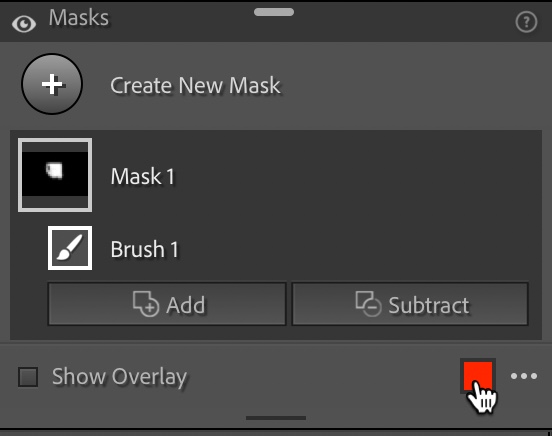
#1: Changing the Red Tint Color If you like the red-tinted overlay (I do), but you’re working on an image with a lot of red in it (like a robin, or a red car, or robin sitting on a red car), you might not be able to see that tint clearly. Your first thought might […]

Read more: 3 Super Handy Masking Tips
Photoshop 2025 New Features: Harmonize, Improved Remove Tool, and Model Picker

Photoshop 2025 New Features: Harmonize, Improved Remove Tool, and Model Picker

Photoshop 2025 introduces ambitious new features that promise to streamline complex editing tasks. The latest update brings automated compositing through the new Harmonize feature, significant improvements to the Remove tool, and enhanced collaboration options for creative teams. These updates represent Adobe's push toward AI-assisted workflows that handle technical Read the full article here: Photoshop 2025 […]

Read more: Photoshop 2025 New Features: Harmonize, Improved Remove Tool, and Model Picker
How to Design a Workshop Poster in Photoshop

How to Design a Workshop Poster in Photoshop

Professional workshop posters combine clean typography with compelling visuals to attract attendees and communicate essential information at a glance. The challenge lies in balancing text hierarchy with visual elements while maintaining readability across different sizes and formats. This Photoshop tutorial demonstrates a structured approach to poster design using basic tools Read the full article here: […]

Read more: How to Design a Workshop Poster in Photoshop
How to Create Realistic Design Mockups in Photoshop

How to Create Realistic Design Mockups in Photoshop

Creating convincing product mockups requires more than simply placing a design onto a template. Real fabric surfaces have subtle color variations, texture bumps, and complex lighting that affect how printed designs actually appear. This comprehensive tutorial demonstrates professional techniques for building realistic mockups from scratch. You'll learn to Read the full article here: How to […]

Read more: How to Create Realistic Design Mockups in Photoshop
Hair Selection in Photoshop: Modern AI Tools vs Traditional Techniques

Hair Selection in Photoshop: Modern AI Tools vs Traditional Techniques

Hair selection remains one of Photoshop's most challenging tasks, even with AI-powered tools. The new Select Subject feature with cloud processing offers impressive results, but often sacrifices fine hair details that make selections look natural. This comprehensive comparison reveals when to use modern AI tools versus traditional channel-based Read the full article here: Hair Selection […]

Read more: Hair Selection in Photoshop: Modern AI Tools vs Traditional Techniques
How to Smooth Pixelated Selection Edges in Photoshop

How to Smooth Pixelated Selection Edges in Photoshop

Automatic selections in Photoshop often create jagged, pixelated edges that look unprofessional when zoomed in. These blocky borders can ruin an otherwise perfect cutout, making your work appear amateurish regardless of how carefully you made the initial selection. Three simple sliders in Photoshop's Select and Mask workspace can Read the full article here: How to […]

Read more: How to Smooth Pixelated Selection Edges in Photoshop