Skip to content
Schenectady Photographic Society

Schenectady Photographic Society

Established 1932
Schenectady Photographic Society
Menu
  • Home
  • Downloads
    • The Focus
    • Annual Reports
    • New Member Info
  • Competitions
    • Assigned Topics for 2026-2028
    • Print
      • Competition Galleries
      • Competition Results
        • 2025-2026
        • 2024-2025
        • 2023-2024
        • 2019-2020
        • 2018-2019
        • 2017-2018
        • 2016-2017
        • 2015-2016
      • Competition Rules
      • Submission Card Creator
    • Digital Image
      • Submissions
        • 2026-2027
        • 2025-2026
        • 2024-2025
        • 2023-2024
        • 2022-2023
        • 2021-2022
        • 2020-2021
        • 2019-2020
        • 2018-2019
        • 2017-2018
        • 2016-2017
        • 2015-2016
      • Competition Results
        • 2026-2027
        • 2025-2026
        • 2024-2025
        • 2023-2024
        • 2022-2023
        • 2021-2022
        • 2020-2021
        • 2019-2020
        • 2018-2019
        • 2017-2018
        • 2016-2017
        • 2015-2016
      • Preparation Guidelines
      • Competition Rules
    • Photo Essay
      • Competition Rules
  • Programs
    • Mentoring
    • Field Trips
    • Traveling Exhibits
  • Events
    • Full Events Calendar
    • Luba Ricket Creativity Award
      • Submission Form
  • News
    • Announcements
    • Photoshop
    • Lightroom
  • Links
  • About SPS
    • Our FAQ
    • Directions
    • By-Laws
    • Constitution
    • Board of Directors
    • Betty Barker Award
    • Liability Waiver and Safety Requirements Agreement
    • SPS In the News
      • Heritage of Vision - 518 Profiles Magazine
      • 80th Anniversary - Daily Gazette
  • Join Us
CLOSE
Schenectady Photographic Society

Upcoming Events

October 28, 2026
  • Event Night  Add to Calendar
    7:00 pm - 9:00 pm
    2 weeks ago
    See more details

November 4, 2026
  • Print Competition  Add to Calendar
    7:00 pm - 9:00 pm
    4 days ago
    See more details

November 11, 2026
  • Digital Competition  Add to Calendar
    7:00 pm - 9:00 pm
    3 days from now
    See more details

November 18, 2026
  • Event Night  Add to Calendar
    7:00 pm - 9:00 pm
    1 week from now
    See more details

November 25, 2026
  • No Meeting (Thanksgiving)  Add to Calendar
    7:00 pm - 9:00 pm
    2 weeks from now
    See more details

December 2, 2026
  • Print Competition  Add to Calendar
    7:00 pm - 9:00 pm
    3 weeks from now
    See more details

December 9, 2026
  • Digital Competition  Add to Calendar
    7:00 pm - 9:00 pm
    1 month from now
    See more details

December 16, 2026
  • Event Night  Add to Calendar
    7:00 pm - 9:00 pm
    1 month from now
    See more details

December 23, 2026
  • No Meeting (Christmas Holiday)  Add to Calendar
    7:00 pm - 9:00 pm
    2 months from now
    See more details

December 30, 2026
  • No Meeting (New Year's Holiday)  Add to Calendar
    7:00 pm - 9:00 pm
    2 months from now
    See more details

January 6, 2027
  • Print Competition  Add to Calendar
    7:00 pm - 9:00 pm
    2 months from now
    See more details

January 13, 2027
  • Digital Competition  Add to Calendar
    7:00 pm - 9:00 pm
    2 months from now
    See more details

January 20, 2027
  • Event Night  Add to Calendar
    7:00 pm - 9:00 pm
    2 months from now
    See more details

Category: News

Ten of My Favorite Lightroom Masking Shortcuts

Here they are – my top 10 favorite Masking shortcuts (in no particular order): Shift + O toggles you through the different Mask colors (you’re not stuck with just that red tint overlay). When you’re using…

View More Ten of My Favorite Lightroom Masking Shortcuts

How to Remove Unwanted Objects in Different Ways in Photoshop

Do you have photographs with distracting elements that need removing? In this insightful Photoshop tutorial from artist Zak Eazy, viewers will learn several effective techniques for eliminating unwanted objects from their images. Whether it’s removing…

View More How to Remove Unwanted Objects in Different Ways in Photoshop

Merge two photos in just a few clicks using Photoshop’s Generative Fill

Photoshop Training Channel presents a helpful guide for blending multiple images together with ease. Generative Fill is one of Photoshop’s most powerful but underutilized tools, and in this video PTC shows users how they can…

View More Merge two photos in just a few clicks using Photoshop’s Generative Fill

Photoshop 2024 Reveals Major New Tools and Enhancements

For creative professionals, Photoshop is an indispensable part of the workflow. As the leading digital imaging software, each new version from Adobe brings excitement as artists and designers anticipate how their capabilities may be expanded.…

View More Photoshop 2024 Reveals Major New Tools and Enhancements

Now that Generative Fill is officially in Photoshop, I did a Q&A so we can stop freakin’ the heck out!

Last week, Photoshop’s Generative Fill became “all grown up,” it moved out of the “Beta” version of Photoshop and it now lives in regular ol’ Photoshop (well, the latest version, which is Photoshop 2024). As…

View More Now that Generative Fill is officially in Photoshop, I did a Q&A so we can stop freakin’ the heck out!

Updating to Photoshop 2024, Your Questions Answered

All your Photoshop 2024 Questions answered. I recently made a tutorial on all the new features of Photoshop 2024. I got a lot of questions and comments on Youtube and various social medias, so I’ll…

View More Updating to Photoshop 2024, Your Questions Answered

Making Virtual Copies from Snapshots

I recently wrote about how to save your virtual copies as snapshots. This provides both a way to access edits across all virtual copies (and original) as well as a way to have those snapshots…

View More Making Virtual Copies from Snapshots

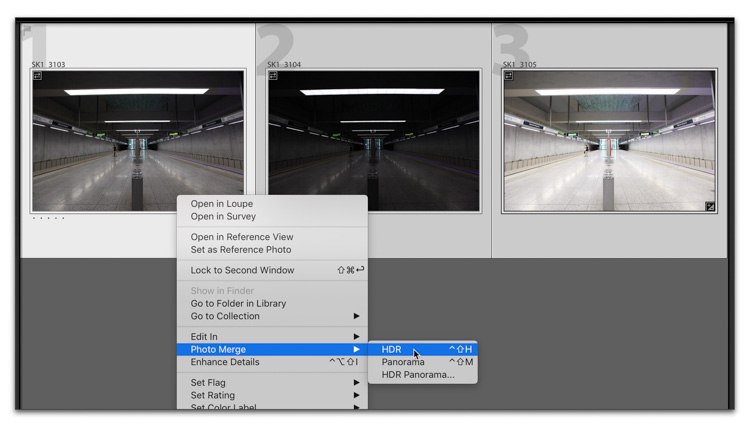
What The ‘Auto’ button does in the HDR Preview Window (sounds boring, but it’s not)

Today, we’re looking at something that I hope you’ll find helpful — it’s about the Auto button in the HDR Preview window, what it does, why it’s helpful, and a little about the advantages of creating…

View More What The ‘Auto’ button does in the HDR Preview Window (sounds boring, but it’s not)

Posts pagination

Previous page Page 1 … Page 150 Page 151 Page 152 … Page 287 Next page
Schenectady Photographic Society
Established 1931
Site design by Sean P Sullivan
Copyright © SPS|Concepts
Terms of Service/Privacy Policy