Schenectady Photographic Society

Menu

Photoshop Tutorials

Game Boy Pixel Effect Tutorial in Photoshop

Game Boy Pixel Effect Tutorial in Photoshop

The distinctive monochrome pixelated aesthetic of the original Game Boy has become an iconic visual style that evokes powerful nostalgia for classic handheld gaming. This technique transforms ordinary photographs into high-contrast, pixelated artwork that mimics the characteristic black and white display of Nintendo's legendary portable console. The process Read the full article here: Game Boy […]

Read more: Game Boy Pixel Effect Tutorial in Photoshop
How to Cut Out Trees Using Blend If in Photoshop

How to Cut Out Trees Using Blend If in Photoshop

Trees with complex branching patterns challenge traditional selection tools, often leaving messy edges and incomplete cutouts. The Blend If feature offers a powerful alternative for extracting trees from contrasting backgrounds by targeting specific color channels rather than attempting pixel-by-pixel selection. This technique works particularly well when trees are photographed against Read the full article here: […]

Read more: How to Cut Out Trees Using Blend If in Photoshop
Should You Use Photoshop's New AI Credit System or Stick to Traditional Tools

Should You Use Photoshop's New AI Credit System or Stick to Traditional Tools

Adobe's credit-based AI system is creating a dilemma for photographers and digital artists. With 250 monthly credits that can disappear after just a few generative fill operations, many are questioning whether these new tools are worth the investment or if traditional skills remain more valuable. This perspective from Read the full article here: Should You […]

Read more: Should You Use Photoshop's New AI Credit System or Stick to Traditional Tools
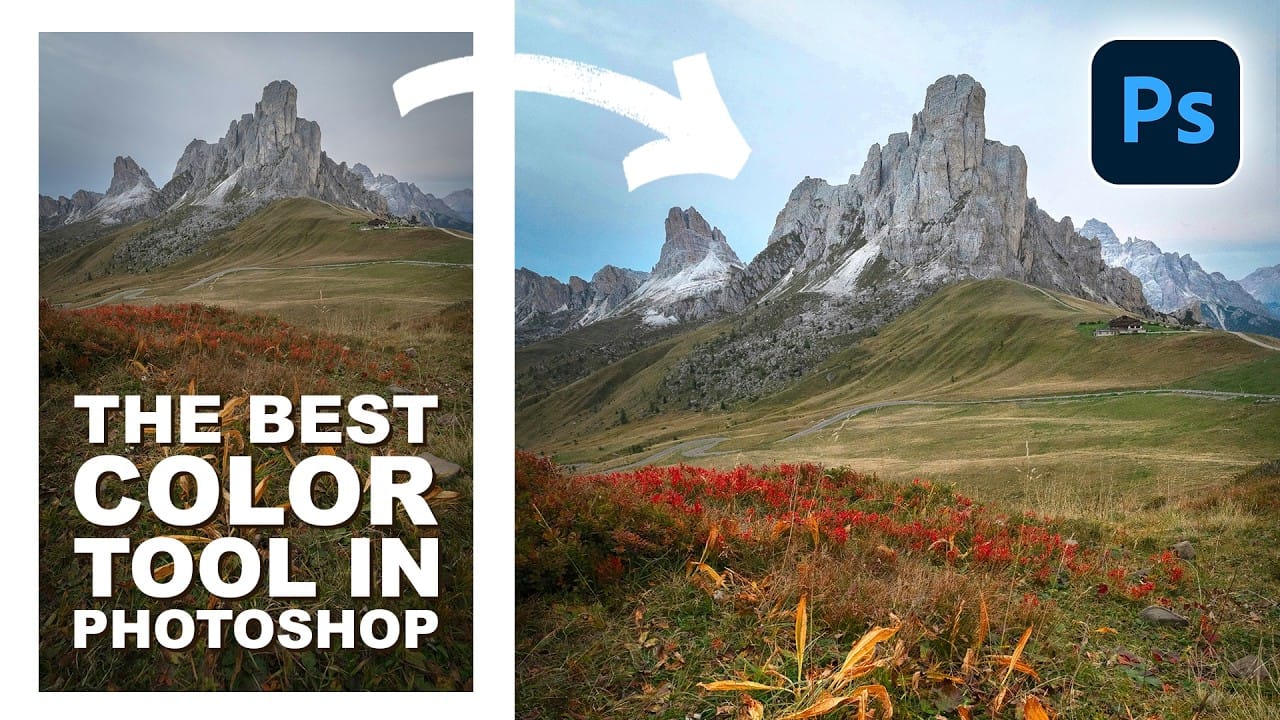
How to Use Point Color in Photoshop's Camera Raw Filter for Precise Color Adjustments

How to Use Point Color in Photoshop's Camera Raw Filter for Precise Color Adjustments

Point Color, hidden within Photoshop's Camera Raw filter, offers unprecedented control over individual colors in your images. This powerful tool lets you target specific color ranges with precision, adjusting hue, saturation, luminance, variance, and range for each selected area. Unlike traditional color adjustment methods, Point Color uses an Read the full article here: How to […]

Read more: How to Use Point Color in Photoshop's Camera Raw Filter for Precise Color Adjustments
How to Convert Raster Images to Vector Paths in Photoshop

How to Convert Raster Images to Vector Paths in Photoshop

Converting photographs into scalable vector graphics opens up endless possibilities for logos, stencils, and graphic design projects. This workflow transforms any raster image into clean vector paths that maintain crisp edges at any size, perfect for everything from business cards to billboard designs. The process combines strategic image preparation with Read the full article here: […]

Read more: How to Convert Raster Images to Vector Paths in Photoshop
Create a Grainy Threshold Effect in Photoshop

Create a Grainy Threshold Effect in Photoshop

The threshold effect transforms photos into bold black-and-white graphics, but harsh edges can make results look digital and flat. Adding grain before applying threshold adjustments creates smoother transitions and authentic vintage texture that mimics classic print aesthetics. This technique combines smart objects, Camera Raw grain, and threshold adjustments to build Read the full article here: […]

Read more: Create a Grainy Threshold Effect in Photoshop
27 Retro Photoshop Effects to Fix Your Painfully Boring Designs

27 Retro Photoshop Effects to Fix Your Painfully Boring Designs

At some point, most designs start to feel a little too familiar. Clean layouts, safe color choices, the same effects over and over… everything works, but nothing really stands out. It’s not bad design—it’s just predictable. And that’s usually when things start to feel, well… a Read the full article here: 27 Retro Photoshop Effects […]

Read more: 27 Retro Photoshop Effects to Fix Your Painfully Boring Designs
How to Create a Retro-Futuristic Poster in Photoshop

How to Create a Retro-Futuristic Poster in Photoshop

The 1980s retro-futuristic aesthetic combines electric colors, neon glows, and surreal imagery to create designs that feel both nostalgic and forward-looking. This style captures the era's vision of the future through bold cyan and magenta palettes, dreamy atmospheric effects, and dramatic lighting. Join Adobe's Gabriella as Read the full article here: How to Create a […]

Read more: How to Create a Retro-Futuristic Poster in Photoshop