Schenectady Photographic Society

Menu

Photoshop Tutorials

Image Adjustments vs Adjustment Layers in Photoshop: Destructive vs Non-Destructive Editing Explained

Image Adjustments vs Adjustment Layers in Photoshop: Destructive vs Non-Destructive Editing Explained

Every tonal and color change made through the Image menu is permanent — once applied, those edits are baked into the pixels with no way to revisit individual settings. Adjustment layers solve this by keeping each change on its own editable, maskable layer, so nothing in the original image is ever Read the full article […]

Read more: Image Adjustments vs Adjustment Layers in Photoshop: Destructive vs Non-Destructive Editing Explained
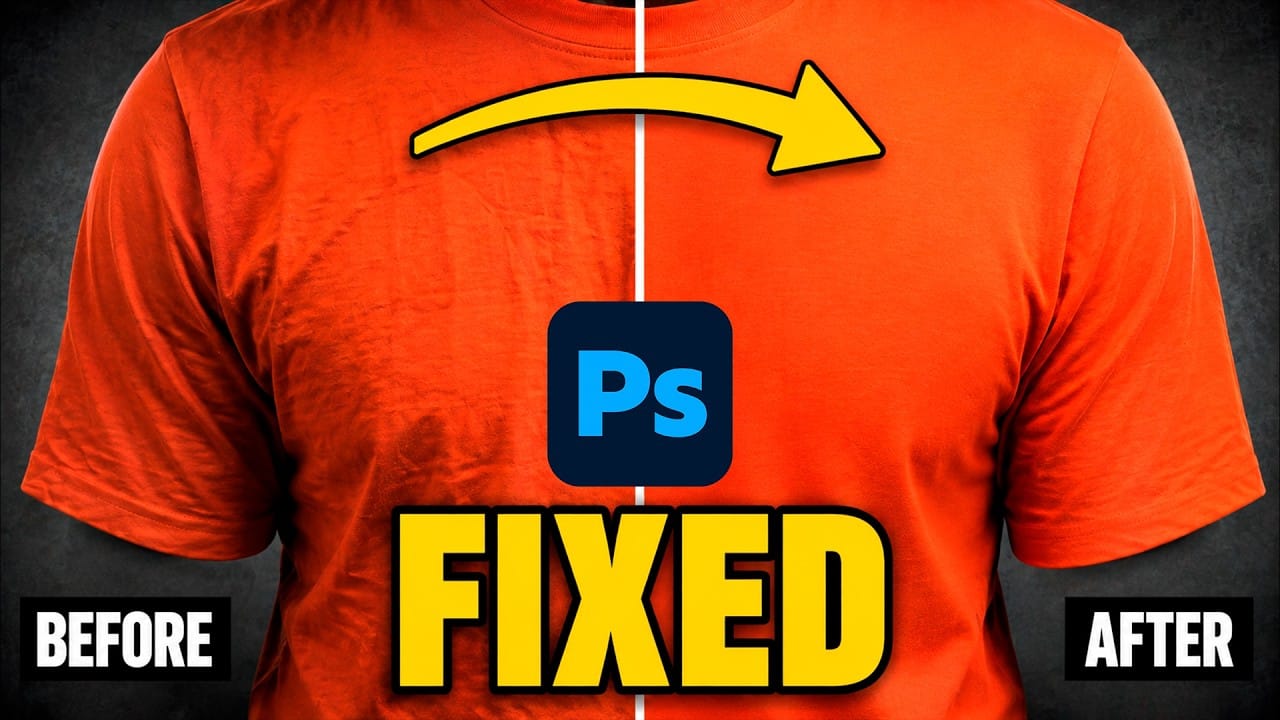
How to Remove Creases from Clothing and Fabric Backdrops in Photoshop Using AI

How to Remove Creases from Clothing and Fabric Backdrops in Photoshop Using AI

Creased clothing and fold lines in fabric backdrops are common problems that are difficult to control on a shoot day. Using generative AI tools in Photoshop, you can remove them in a matter of clicks — preserving fabric texture, detail, and the overall integrity of the original photograph. Watch the Video Read the full article […]

Read more: How to Remove Creases from Clothing and Fabric Backdrops in Photoshop Using AI
How to Build a Soft Highlight Glow Effect Manually in Photoshop

How to Build a Soft Highlight Glow Effect Manually in Photoshop

A soft light bloom adds depth and atmosphere to portraits and nature shots without making them look over-processed. This technique isolates the actual highlight information from your photo, blurs it across multiple layers, and finishes with color grading and grain — all built manually using standard Photoshop tools. Watch the Read the full article here: […]

Read more: How to Build a Soft Highlight Glow Effect Manually in Photoshop