Schenectady Photographic Society

Menu

Photo compositing

How to Combine AI Tools and Traditional Techniques for Realistic Composites in Photoshop

How to Combine AI Tools and Traditional Techniques for Realistic Composites in Photoshop

AI background removal gets you most of the way to a clean cutout, but fur, hair, and fine edges demand hands-on refinement. This tutorial by Jesús Ramirez walks through a complete compositing workflow — building a custom fur brush, refining a layer mask, harmonizing lighting with generative AI, and applying Read the full article here: […]

Read more: How to Combine AI Tools and Traditional Techniques for Realistic Composites in Photoshop
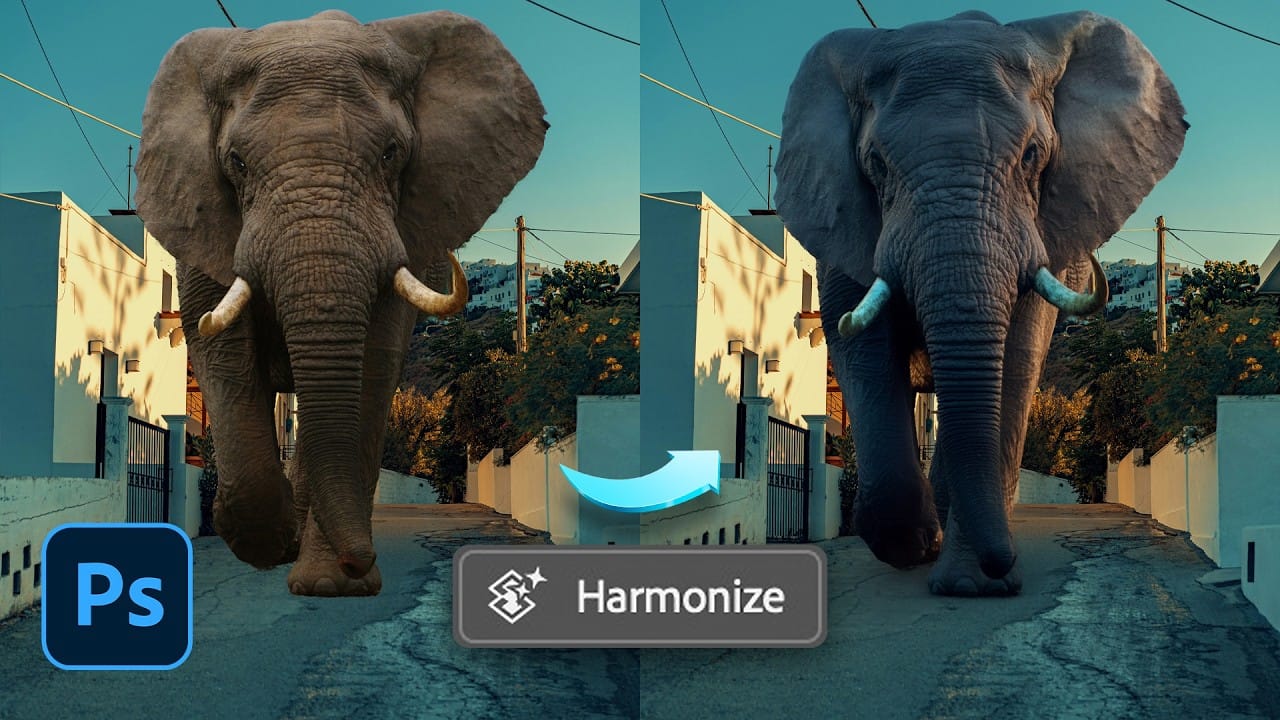
How to Use the Harmonize Tool for Advanced Photo Compositing in Photoshop 2026

How to Use the Harmonize Tool for Advanced Photo Compositing in Photoshop 2026

The Harmonize tool transforms compositing by automatically adjusting lighting, color, and shadows to blend objects seamlessly into new backgrounds. This AI-powered feature analyzes both your subject and background, then creates realistic color bleed, reflections, and contact shadows with a single click. While the tool delivers impressive results instantly, combining it Read the full article here: […]

Read more: How to Use the Harmonize Tool for Advanced Photo Compositing in Photoshop 2026
How to Use Harmonize and Rotate Object Tools for Better Composites in Photoshop

How to Use Harmonize and Rotate Object Tools for Better Composites in Photoshop

Creating believable composites traditionally required hours of manual perspective adjustments and color matching. Two new AI-powered tools in Photoshop change this workflow dramatically. The Rotate Object tool lets you adjust positioning and perspective with interactive 3D controls, while the Harmonize tool automatically matches lighting, shadows, and color tones to blend Read the full article here: […]

Read more: How to Use Harmonize and Rotate Object Tools for Better Composites in Photoshop
Creating Whimsical AI Composites with New Photoshop Tools

Creating Whimsical AI Composites with New Photoshop Tools

AI-generated imagery becomes truly compelling when combined with traditional compositing techniques. This behind-the-scenes look explores how to transform AI-created elements into cohesive, whimsical scenes using both classic methods and Photoshop's newest features. The tutorial demonstrates a complete workflow from background extension to character integration, showcasing how multiple adjustment Read the full article here: Creating Whimsical […]

Read more: Creating Whimsical AI Composites with New Photoshop Tools
Creating Album Covers with AI Image Generation and Natural Language Editing

Creating Album Covers with AI Image Generation and Natural Language Editing

Album cover design combines visual storytelling with technical precision, requiring both creative vision and the ability to execute complex compositions. Generative AI tools now enable designers to create professional-quality album artwork through text prompts and natural language editing commands. This workflow demonstrates how to generate base images, apply targeted edits, Read the full article here: […]

Read more: Creating Album Covers with AI Image Generation and Natural Language Editing
Add Floral Patterns to Black Dresses Using Brushes in Photoshop

Add Floral Patterns to Black Dresses Using Brushes in Photoshop

Transform plain black clothing into vibrant, patterned garments using custom brushes and strategic layer blending. This non-destructive technique combines precise selections with clipping masks to paint realistic floral designs directly onto fabric while preserving the original photograph. The method works particularly well on black materials because the hard light blend Read the full article here: […]

Read more: Add Floral Patterns to Black Dresses Using Brushes in Photoshop
How to Replace Objects Using Reference Images in Photoshop Generative Fill

How to Replace Objects Using Reference Images in Photoshop Generative Fill

Reference images transform Generative Fill from a text-based tool into a precise visual command system. Instead of describing what you want, you show the AI exactly which object to create, leading to more accurate and predictable results. This technique works by combining traditional selection tools with the new reference image Read the full article here: […]

Read more: How to Replace Objects Using Reference Images in Photoshop Generative Fill